


EVision Customer Portal Logging Calls
Logging a Support call is simple. This page tells you how to get in touch and what you can expect after your call has been logged.
If you’re looking for a quick answer to quite a basic question, the chances are you’ll find it within this Support FAQs document.
The following versions of EVision are supported by Eque2:
- EV 3.60
- EV 4.00
- OS 5.00 V6 Technical – V3.60, V4.00, V5.00,
- EV 6.01
- EV 6.02
- EV 7.00
- EV 7.01
- EV 8.00 – EV 8.02.8
- EV10
- EV13
- Business Central Cloud
How to get in touch
To ensure no duplication of calls, please contact us via one of your company’s agreed super-users. Calls can be submitted to Support via email or telephone, however email is preferred and system messages and screen snapshots should be included where possible. Please always use the Support email address rather than individual email addresses. The Support mailbox is constantly monitored to ensure timely responses to any request.
Support Opening Hours: Mon-Fri 9am to 5pm
Email: evision.support@eque2.com
Telephone: 0845 245 6401 Option 1/2
Support Manager: Anne Marie Kennedy
Support Analysts: Douglas Neill, Alex Lynch, Saad Akram
If you’re not a Microsoft Outlook user, please follow the instructions below when submitting your email:
- Open your email message and ensure that the send address is evision.support@eque2.com,
- Switch to the EVision application and display the relevant screen, preferably with a system message and as much relevant input data as the screen will show.
- Pressing the <Alt> key and the <Prnt Scrn> key will take a copy of the screen into the system clipboard.
- Switch back to your email message and place the cursor in the main message area, then choose the Edit menu and select the Paste option. This should insert a copy of the EVision screen into your email. Alternatively, paste into another document and attach that document to the email
If you experience any problems, please phone the number above.
What happens next?
When a support call is logged, a unique support call number is allocated to the incident. This call number will be communicated back to you as part of the call logging procedure.
Once logged, Support staff will rate the urgency of your call as follows:
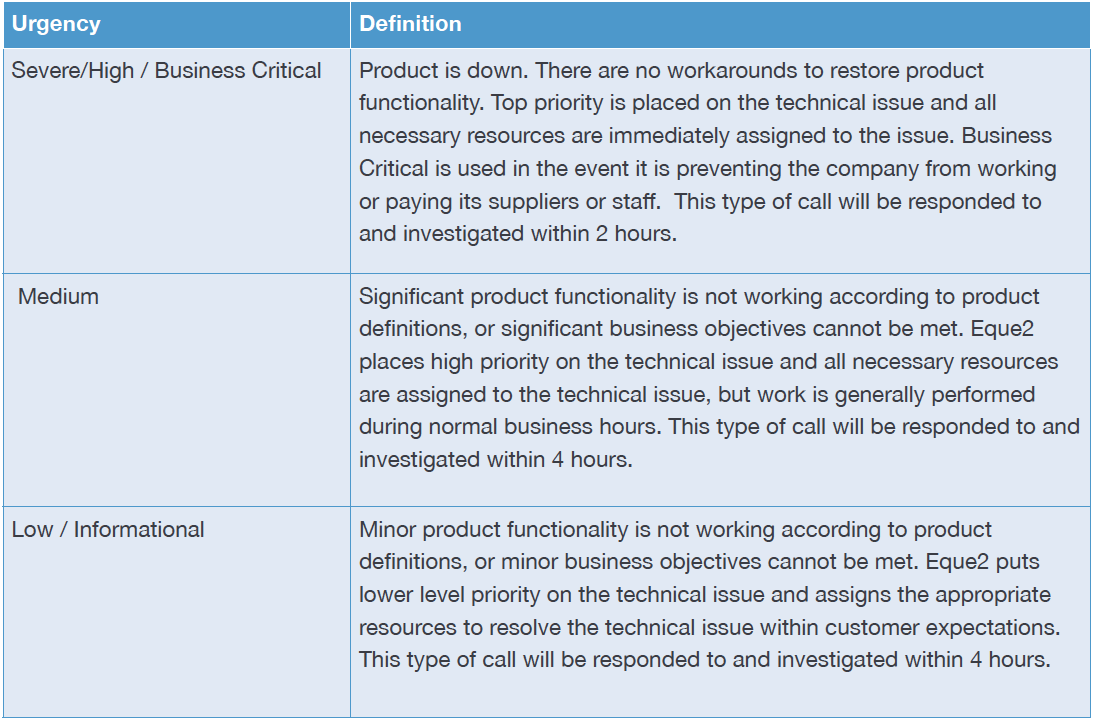
If an acceptable workaround can be applied to the issue, then the urgency may be downgraded to the next level.
Whilst we will attempt to resolve all calls at the earliest opportunity and within the timescales detailed above, this does not guarantee call resolution within this timescale.
Once a call is being actioned, we made need to remotely access your system to investigate the matter further.
Escalating a call
Customer calls are prioritised so please be mindful that certain types of call, for example payroll processing or complete system failure, will be prioritised above other functionality. However if you feel that your call is not being handled appropriately then the call may be escalated to the Support Manager. The escalation process is managed by the member of the Support team dealing with the call and in co-operation with you.
Our Support Manager will review the severity of the call, taking into account the nature and severity of other calls actively being managed by the Support Team.
Support FAQs
This document lists the most frequently asked questions relating to EVision Support and provides short, easy-fix solutions that you can administer yourself.