

Built on the platforms you trust
Microsoft | Sage | Xero
Construction estimating software that takes a tender from drawings and client bills of quantities through to a priced, packaged submission. Estimators work from the same libraries and the same method, so tender output goes up without accuracy coming down.








































































What estimating teams are dealing with before any of this is connected.
Relying on spreadsheet formulas makes it easy to miss an input, which not only sits in the estimate, but carries forward into the budget and the finances behind them. There is no detailed audit trail and version control inside a single document. Most spreadsheets can only be edited by one person at a time, which slows down work that is already against the clock.
Estimators use their own rates and resource codes, so estimates come out inconsistent. Line item descriptions differ between team members, which makes adjudication harder and turns into costly mistakes over time.
Costs move up and down week by week, so teams have to go back into the tender they already submitted and readjust the pricing, line by line. Manual processes cap how many tenders the business can return.
Take-off sits in a separate tool that does not pass quantities into the estimate. Costs are compiled line by line in spreadsheets, supplier prices come in by email and tenders go out through a file share. Every handover adds time and makes a fast turnaround harder and runs the risks of mistakes creeping in.
Material costs move between starting a tender and submitting it, so rates go stale. Estimators need prices from several merchants, manufacturers and subcontractors to secure the best rate. The quotes come back by email, spreadsheet, phone call and PDF.
Slow, inconsistent pricing costs you twice. You return fewer tenders than you could, and the ones you win carry numbers nobody quite trusts as a budget.

Working from first estimating principles, estimators and quantity surveyors take a tender from drawings to submission in one system.
We understand that:


Book a 30-minute call with a construction estimating software specialist. We’ll show you the product, mapped to where your business is now and where it’s going next.
The capabilities estimating teams use to hold accuracy at pace, with the screens they work in.
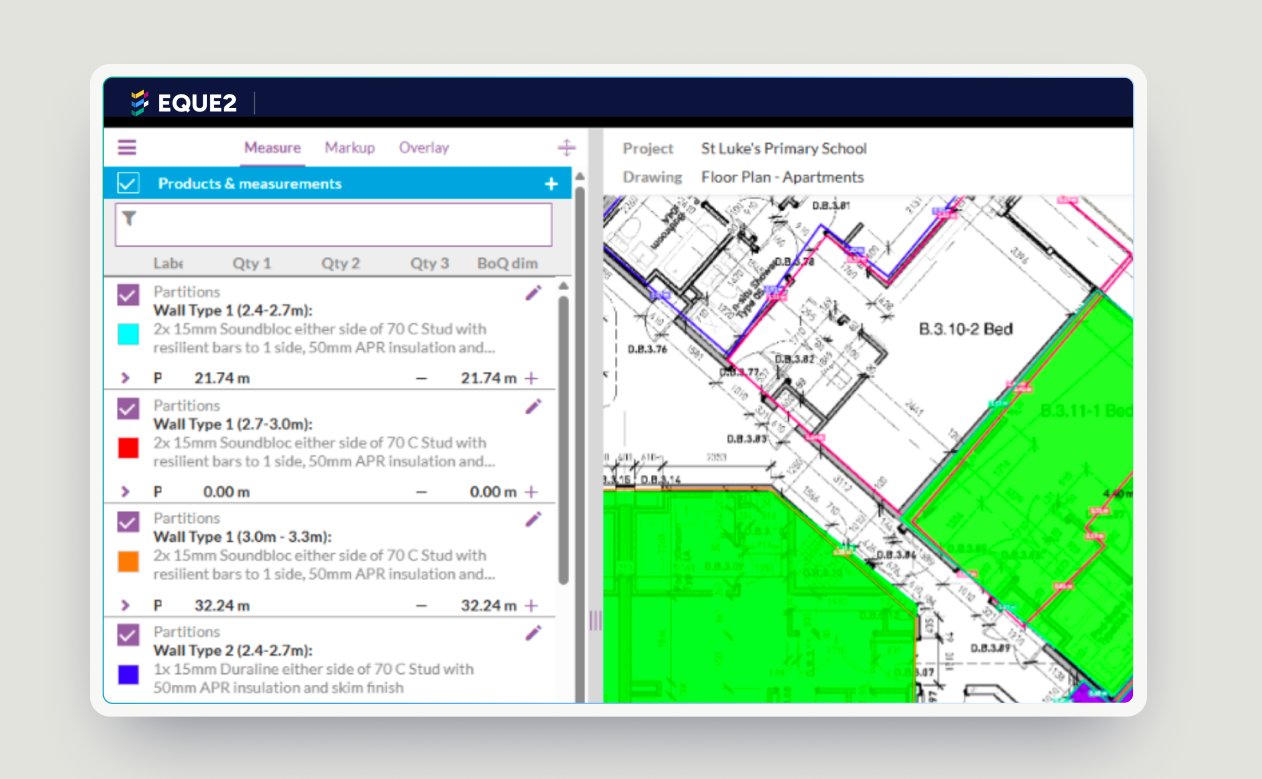
On-screen take-off with a live link, so amended dimensions update bill quantities automatically. Measure from all file types, including PDF, with enhanced CAD drawing and BIM model functionality available. Annotated, colour coded 2D or 3D mark-up with a legend goes out with the tender. That improves the quality of the response and lowers the risk of disputes once the job is won.

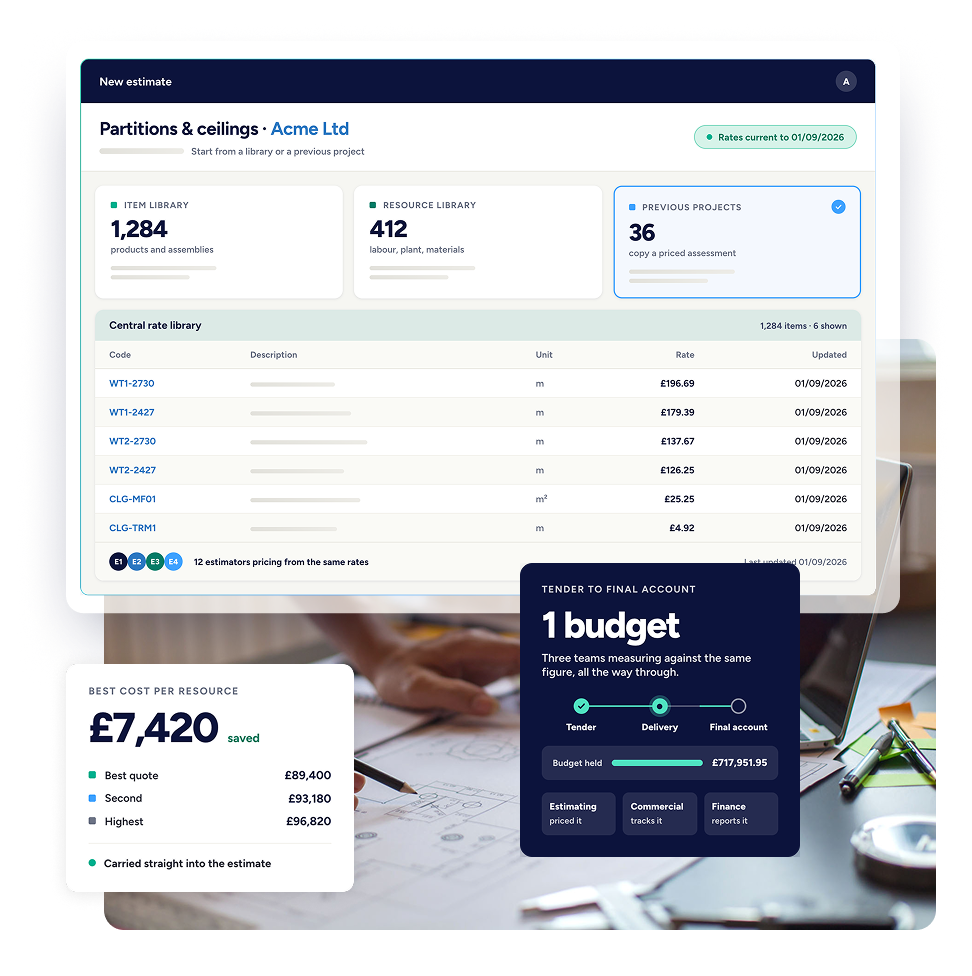
Create estimates from item and resource libraries, or from previous projects, so the work you have already done counts for something. A central library of rates keeps every estimator on the same up-to-date costs.
Send enquiries to multiple suppliers straight from Evaluate and collect the best cost on each resource as you build the estimate. Issue enquiries, drawings and revisions to subcontractors, then collate and analyse the responses through an online portal.
.jpg)
The enquiry email goes out from your own address. Documents and revisions are uploaded to a pin protected hosted portal, and subcontractors submit their response through the same place.
Import a bill of quantities received from the client in any format and price the work. Export it back in the same format to send to them.
Integrated Laxton’s priced libraries in both SMM7 and NRM2 format, with resource build-ups and annual updates. Use them on their own or alongside your own rates library.
Factor prelims, adjustments, overheads, profit and risk contingency against every resource required, so you build up margin and understand the value of the project.
A historic cost database lets estimators produce budgets and cost plans from previous job information, by size, sector and job type, with inflationary uplifts applied.
Value completed work, apply for payment and manage subcontractors in one place. Track valuations, applications, payment notices, payment due dates and pay less dates, with integrated emailing to hold subcontractors to their deadlines. Where an application does not stack up, issue a pay less notice from Evaluate with your certification and the difference in cost.
.avif)
Use our estimating software standalone, or combine with our commericial management solutions to manage the full project lifecycle from intial estimate to final account.
Estimating with take-off built in. On-screen take-off with a live link to the bill, mark-up and overlay, and one central set of drawings, measures and mark-ups.
Job costing, commitments, applications and commercial reporting alongside your existing accounting, with approval limits that hold before spend affects the contract.

The same cost model across multiple companies and locations, with CVR version control and consolidated commercial reporting for the group.

Estimating software is built for construction estimating, where a spreadsheet is a general-purpose tool that relies on manual input and maintenance. You can build an estimate in a spreadsheet. Dedicated estimating software produces more accurate, consistent tenders using standardised cost libraries, reusable templates, historical pricing data and automated calculations. That cuts formula errors, duplicated work and the lack of version control.
Not directly. Construct is the product that integrates with Sage 50, Sage 200, Sage Intacct and Xero. Evaluate connects to Construct and Evision, so the estimate carries through into job costing, commercial management and finance.
Yes. Import a client bill in any file format, with the columns mapped automatically, and price the work in Evaluate. Export it back in the same format to return to the client.
Yes. On-screen take-off has a live link to the bill, so amended dimensions update the quantities automatically. Nobody rekeys measurements between a take-off tool and a spreadsheet, and revised drawings do not mean measuring the whole thing again.
Book a demo and we will build a bill on the kind of work you price, from take-off through to settlement. If you would rather talk it through first, request a call.